
Beer Scoring
Pub Beer Scoring and the Good Beer Guide
Beer Scoring and the Good Beer Guide
You are probably aware of the ‘Good Beer Guide’, CAMRA’s flagship publication which lists the best pubs in the UK. But what you may not know is how those pubs are selected to appear in the Guide. The answer is that it is largely via beer scores submitted by CAMRA members from all over the country. So, if you are a CAMRA member you can send in beer scores, if you’ve ever wondered why your favourite pub isn’t in the Guide, this may well be because you, and others, haven’t entered scores rating the quality of beer there. By beer scoring, you can contribute to the process of selection of pubs that go in the Good Beer Guide.
So how do I score the quality of the beer?
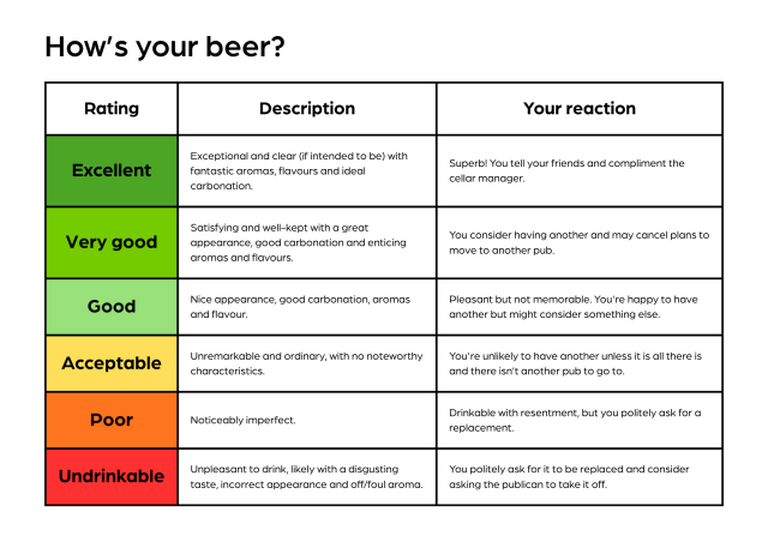
You don’t have to be an ‘expert’ to begin scoring your beer. However, it is not about your personal favourite beer receiving the highest scores! You may try a beer that isn’t to your normal taste but what you need to consider is the quality of that beer, how well the pub has kept it and served it and score it according to the general guide below.
2. You can then search for your pub by name. Be careful here as there are many pubs in the country which share the same name. The advice is to search by the pub name and the town. The Camra Experience smart phone web page also gives you the option to search for real ale pubs nearby, very useful if you are in an unfamiliar town.
3. Once you have found your pub a 'Beer Score' box will appear on the right hand side of the screen (or on the pub photo if you are using a smart phone). 4. Simply fill in the date and your score then as you begin typing the list of possible beers should automatically appear underneath where you are typing. Click on the correct beer. The brewery name and beer name in the boxes. You can add a comment if you wish and a price per pint in pounds if you want. Click 'Submit and score again' if you another beer to score at that pub, or 'Submit and close' if not. Your score will go into the database. It is as simple as that. An added bonus is that it will keep a record of your scores so you can look back at what you have had and how you rated them if you want.
4. Simply fill in the date and your score then as you begin typing the brewery name should automatically appear underneath were you are typing. You do not have to enter the name of the beer your are drinking but if you wish to do so once you have entered the brewery name you should be able to click on the arrow in the Beer box and a drop down list of that brewery's beers should appear. In some cases the beer you are drinking may be new or a one off by the Brewery so may not appear on the list, if this is the case you can simply type in the beer name. Select the correct one click 'submit score' and your score will be entered into the database.
It is as simple as that.
An added bonus is that it will keep a record of your scores so you can look back to see what beers you have had and how you rated them if you want.